
About a month ago, I posted on a basic setup of W3 Total Cache, a WordPress plugin designed to decrease page load times to improve user experience and SEO. Based on the needs of visitors here, I thought I would go more in-depth into the browser caching feature of W3TC.
How To Leverage Browser Caching in W3TC
Enabling your WordPress site to leverage browser caching can be done in 5 steps.
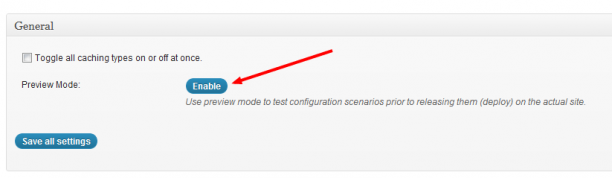
Step 1. Enable Preview Mode
Before tweaking any settings within W3 Total Cache, make sure you enable preview mode. This setting will allow you to see how the website performs with the new settings before going live with them. Click the “Enable” button to deploy preview mode on your site. This can be found from the General setting tab.
Step 2. Enable Browser Caching
You must enable Browser Caching within W3TC in order to leverage general browser caching. On the general settings of W3TC, scroll down and enable the Browser Cache.

Step 3. Specify Cache Headers
After you’ve enabled browser caching, click the “Browser Cache” section at the top of the plugin configuration, which will bring you to a page with general and specific settings for different configurations of cache headers. Below is a starting configuration and explanation of settings.
General Settings
These check boxes will toggle these settings for the next three sections down. It is recommended that you check the following 5 boxes (and what those boxes represent).
- Set expires header – The expires header is an expiration time of an entity of the web, whether an HTML document, CSS file, image, etc. The length specified in this header will control how long the cache of the entity is valid.
- Set cache control header – The cache control header is an additional header to encourage browser caching.
- Set entity tag (eTag) – The eTag is a validation tag that makes browser caching more efficient.
- Set W3 Total Cache Header – This is a header set by W3TC to assist in identifying optimized files.
- Enable HTTP (gzip) compression – Gzip compression will reduce the download time for text-based files.

Now that you have your global settings enabled for browser caching, it’s time to get more in-depth and specific with different sections.
CSS & JS
If you checked all of the boxes correctly in the general settings above, there will only be one change you need to make in this section. Under the “set expires header” section, change the value in “Expires Header Lifetime” to 604800. This is the amount of seconds that a CSS or JS file will be until a new cache of that file is created. 604800 seconds is the equivalent of two weeks, the minimum recommend time for ideal page speed optimization. You can increase the value here if you wish, but just be sure to clear your cache if you make changes to these files, that way users can be served the most up-to-date version of your site.
HTML & XML
HTML and XML files change much more frequently. There should be no changes made here. Make sure you leave the “Expires Header Lifetime” set to 3600 seconds. This controls elements of an HTML page all the way down to text, so make sure this is short enough to reflect how often a page could be updated. 3600 seconds (1 hour) is standard practice.
Media & Other Files
Mimic the settings of the CSS and JS section as these files rarely change.
Step 4. Save and Preview Your Caching Settings
Save your settings and preview your changes by clicking preview at the top of the plugin settings. This will open up a new browser window or tab. From here, you can check the difference in browser caching and how it impacts page speed. I recommend the Google Page Speed plugin. Install the extension for your browser and run the page speed scripts on your page. There may be a few outside elements (CSS, JS) hosted on other sites that may be out of your control in relation to browser caching. Don’t panic, most of these come from plugins. The majority of the files that you want to cache are already hosted in your server. Check the difference in Page Speed Score by running the scripts on the preview of your cache as well as the version without.
Step 5. Deploy W3 Total Cache Settings
Once everything looks good with the W3TC preview, go back to the plugin settings and click deploy, which will migrate all settings toggled in preview mode over the live version.
Notes on Caching
With the correct implementation of W3 Total Cache, leveraging browser caching will improve the speed of your website, giving users a better experience as well as improving SEO. As a WordPress developer, testing settings and implementing them can be tedious. Always use preview mode when making any changes, as they can greatly affect the way your site performs and even looks. Once you have the process down, you’ll be able to enjoy page speed scores of 90 and above! Good luck!



Thanks Ian for the extensive explanation on this great plugin. After reading your instructions, I was able to set up W3 Total Cache in 5 minutes and increased my page screen score to 92.
-Kathleen
You’re welcome! I’m glad the guide is easy to use to get W3TC set up. Browser caching will greatly improve your page speed score. I’m working on a few more posts for improving page speed.
Thanks for the clarification of the browser cache settings, it bumped my google page speed from 90 to 92!
I set up w3 cache and tested my sites speed on pingdom and the result were great about 3 second load time, thanks Ian
Any reason for not checking “Set cache control header ” option?
Hey Raju-
Thanks for reading.
I am actually due to update this post. Adding the cache control header will be beneficial to you to leverage browser caching. If you are using a CDN, it is definitely in your favor (post coming on this soon). It cannot hurt you to enable, just make sure you test it before you set it live.
Ian,
This post was extremely helpful. I’ve had W3 Total Cache installed from some time on my sites, but wasn’t fully utilizing it. Might be able to create whole series.
I have filled out all the options as recommended above – and yet my score remains the same! Any help would be much appreciated!
For this to work, does mod_expires need to be enabled in Apache?
Thank you very much for you clear explanation! Now my website score has got 91 as your instruction.
Thanks…this saved me. Great info on W3…I was looking for this and you explained it perfect. Thanks again For the post!
Steve
Great walk-through. Quick question, though: why aren’t the settings you mention defaults in the plugin? I just want to make sure I don’t mess with anything I shouldn’t!
Google recommends the browser cache be set to at least 1 week. This guide shows you how to set it up for 1 week. The default values are more than that, so make sure that if you are setting the browser cache at longer than 1 week, it is consistent with the way you work and the frequency of updating those resources.
Jumped from 65 to 77! Thanks, Ian, you’re the best!
Thanks for the article. It helped to configure the cache setting.
How longer before we can see if these changes worked?
Once I applied these settings, I saw a huge improvement in desktop speed but the mobile version of my site went crazy. Is there a particular setting that could cause this, or is it something that has to be resolved another way, like through my theme?
It is possible that the theme could be the issue. If you provide more details or a link I’ll be happy to try and diagnose the issue…thanks for reading Scott!
Thank you so very much! You just saved me a lot of aggravation and shot my site speed into the 90’s. Cheers!
Hello! I’m not a techie but I installed W3 Total Cache. I was looking for the boxes/items on step #3 but when I click “Browser Cache”, it only directs me to #2. I don’t see the 5 items. 🙁 Please help. If you click my Disqus photo it will direct you to my blog/show a link to my website (in case you need info). Thank you so much in advance!
Oh, I found it! 😀
Ok great!
Thank you improved my page speed
Perfect, just what I was looking for, thanks!
Hey, great article – really helpful. Just wanted to point out that in the article you said “604800 seconds is the equivalent of two weeks, the minimum recommend time for ideal page speed optimization.”, but 604800 seconds is actually only 1 week – I just counted and I think I’m right, although I may have lost count a couple times…
Works like charming. Thanks for the tutorial. My pagespeed score is now 94.
Thanks you for the extensive explanation on this great plugin. After reading your instructions, I was able to set up W3 Total Cache in 5 minutes and increased my page screen score to 90.
ktateb
Hi Guys, i am trying to leverage the browser caching as google pagespeed tool is asking, i found your post here, but i think i have the latest version of W3 and there is no additional settings to set expiry header ect as you stated, absolutely no options or check boxes , just a simple enable browser cache or disable then it steps into CDN enable, so i am guessing that the version you speak of is old? if so do you know how i can still leverage browser caching with the latest version ?
Thanks Ian for this wonderful and detailed explanation… My website score moved from 76 to 81 but mobile site score is still the same… the weird part is when I tick mark the the ‘Set cache control header, set entity tag and set W3 total cache header’ and click on the save settings, they automatically go blank.. any idea what could be the problem.???
Thanks for this tutorial.
Thanks for sharing this. Greetings from México
Thanks for Sharing this……. My website score moved from 52 to 82
Finally I have found the correct solution of Leverage browser caching I have been searching everywhere but i can’t find right solution of Leverage browser caching..
This is work like charm….Thanks Rogers for sharing.
Thanks for this Rogers. I have set up my site accordingly and now it has a greatly increased speed test.
I have done all of the above but it is coming up with headers from Google URLS. Could someone please help me with regards to this?
Thank for very much Rogers for this interesting tutorial. At the end I was able to improve my Google page speed to 80% in mobile and 74% in desktop. Hope this will improve my ranking. Thanks for sharing. It was really helpful.
I tried W3 Total Cache and other plugins. But all plugins only had a little impact. Also tried to enable caching in the .htaccess. Is there any good lightweight alternative to w3. thanks for sharing
Excellent tutorial. Thank you so much. I was facing leverage browser caching issue on my blog for last some weeks. Now I know how to resolve this.
Love learning more Technical SEO. Technical SEO is key to SEO Sucess. W3 Total cache has so many options i love it. If anyone needs any help with it i hope i can be of services.
Been using W3 Total Cache for a loooong time now and still my go to resource for page load speed – well done people! 🙂
Graham
Thanks, Graham. I’m glad it’s still working well for you!
I did follow your tutorials. But, still, google page speed insights are showing some errors for leverage browser cache. Any suggestions?
Usually, the additional errors are due to the fact that some assets are hosted off of your site. External JS and CSS are usually something you don’t have control over, unfortunately.
I tried your tutorial. But, still, Pingdom speed test on my website shows some errors for leverage browser caching time.
you can add this code at the top of your htaccess for enabling this:
## EXPIRES CACHING ##
ExpiresActive On
ExpiresByType image/jpg “access 1 year”
ExpiresByType image/jpeg “access 1 year”
ExpiresByType image/gif “access 1 year”
ExpiresByType image/png “access 1 year”
ExpiresByType text/css “access 1 month”
ExpiresByType text/html “access 1 month”
ExpiresByType application/pdf “access 1 month”
ExpiresByType text/x-javascript “access 1 month”
ExpiresByType application/x-shockwave-flash “access 1 month”
ExpiresByType image/x-icon “access 1 year”
ExpiresDefault “access 1 month”
## EXPIRES CACHING ##
Thanks for sharing this tutorial,thanks again
But how can I do it in 2019, kindly update the content? Thanks!
Thanks for sharing this tutorial, Applied your method to my website https://t4l.in.net
and now the pageload time has been increased.
Thank you.
Do you have a tutorial on speeding up mobile ?
Thanks a lot! You saved me a lot of hassle and skyrocketed my site speed to ninety.